AutoPod Alternatives: 5 Best Premiere Pro Tools (2026)
Top AutoPod Alternatives for Premiere Pro Editing in 2026 AutoPod is a single-trick pony that costs $348 every single year, and it is driving Premiere Pro editors broke. When AutoPod hit the market, i
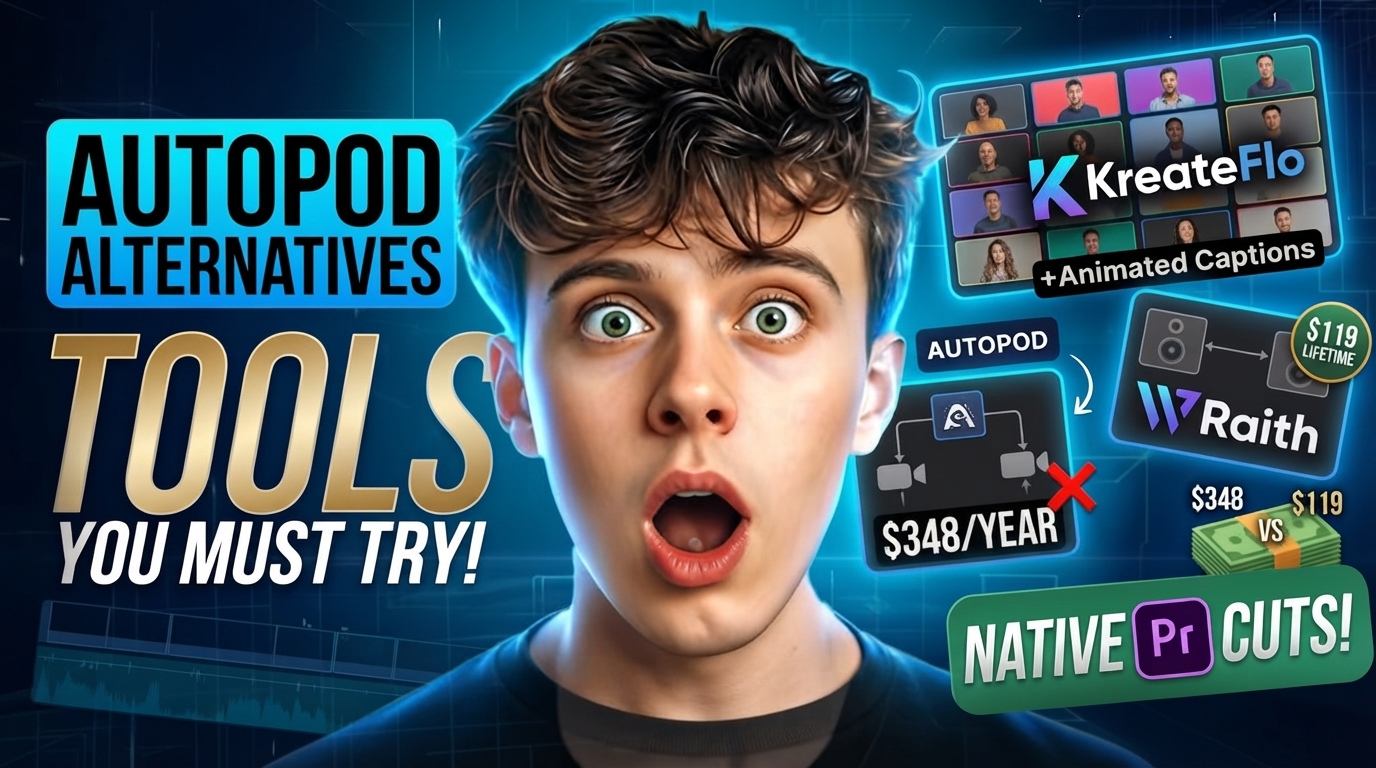
AutoPod is a single-trick pony that costs $348 every single year, and it is driving Premiere Pro editors broke. When AutoPod hit the market, it solved a brutal multi-cam timeline bottleneck. But paying $29 a month for a tool that only switches camera angles makes zero sense when you still need silence removal, animated captions, and short-form reformatting to deliver finished client edits.
Key Takeaways
- AutoPod costs $29 per month ($348/year) strictly for camera switching, forcing editors to stack additional plugins for captions, filler removal, and silence cutting.
- Basic volume-threshold switchers break on crosstalk, guest laughter, and room bleed unless you can tweak anti-flicker settings and shot hold times.
- KreateFlo combines multi-cam switching for up to 8 speakers, silence trimming, and animated captions into a single Premiere Pro panel for $19.99/mo.
- Phantom Editor Wraith gives you a $118-$119 lifetime purchase option if you hate monthly recurring software bills.
- Top automated multi-cam plugins output standard native Premiere Pro sequence cuts on target tracks, keeping your timeline fully editable.
Why Video Editors Are Replacing AutoPod in 2026
I used to run AutoPod on every multi-cam interview that landed in my project panel. It saved time, no question about it. But paying for a standalone camera switcher while subscribing to separate tools for silence cutting and captions felt like burning client retainers.
The Subscription Stacking Problem
AutoPod charges a flat rate, but it only handles camera switching, jump cuts, and basic social reframing. AutoPod costs $29 per month with no lifetime purchase option [1], which adds up to nearly $700 over two years of continuous use [2].
Here's the problem: multi-cam switching is only step one of a podcast edit. When you add a $15/mo silence remover, a $20/mo captioning tool, and a $15/mo auto-reframing app, you are spending over $75 every month just to edit podcasts inside Adobe Premiere Pro. That software bloat eats directly into your project margins.
Audio Bleed and Threshold Failures
On a clean studio recording with isolated dynamic mics, basic volume-based camera switching works fine. But real-world podcast audio is rarely clean.
When a guest laughs out loud or talks over the host, volume-based detection panics. A standard 58-minute three-camera podcast involves 350 to 600 individual camera angle decisions [3]. When microphone bleed triggers false cuts, you spend 20 minutes manually fixing jumpy timeline edits anyway.
| Before | $29/mo (AutoPod) |
|---|---|
| After | $19.99/mo (KreateFlo) |
Pro Tip: Clean up audio bleed with noise gates or clip gain adjustments before running automated multi-cam switching inside Premiere Pro to prevent accidental camera cuts.
Actionable Takeaway: Audit your monthly software bills today to calculate exactly how much you spend stacking single-purpose video plugins.
Top AutoPod Alternatives for Premiere Pro Editing in 2026: Comparison Criteria
Not all multi-cam plugins cut timeline sequences the same way under the hood. To evaluate the best AutoPod alternatives, we need to examine panel integration, switching accuracy, and pricing models.
Native CEP Extension vs External Apps
You should never have to export XML files or leave your sequence just to generate cuts. Native CEP extensions operate directly inside Adobe Premiere Pro, keeping project files lightweight and fast.
Plugins that build standard cuts on native timeline tracks let you tweak edit points with Premiere's standard trim tools. If a plugin locks your cuts inside a proprietary web app wrapper, it slows down your entire post workflow.
Speaker Detection Accuracy and Hold Times
The true test of a multi-cam plugin is how it handles rapid dialogue exchange. Simple volume-threshold switching frequently fails on overlapping conversation [4] and unisolated room reverb.
Granular controls for minimum shot hold durations (e.g., 2.5 seconds) and anti-flicker thresholds are mandatory. Without these settings, automated cuts jump back and forth between angles every time someone takes a sharp breath.
Pricing Models and Multi-Tool Bundling
Some developers charge a monthly fee for a single function. Others bundle multi-cam switching into complete post-production suites inside Premiere Pro.
While AutoPod supports up to 10 cameras and 10 microphones [5], most working editors handle 2 to 4 camera setups. Paying $29/mo for extra camera channels you never use makes no sense when multi-tool platforms give you more editing capability for less money.
600 per 1-hr podcast episode
Actionable Takeaway: Pick plugins that run directly as CEP panels in Premiere Pro to avoid round-trip rendering lag.
KreateFlo: Complete Premiere Pro CEP Extension with 33+ Tools

If you want to replace single-purpose plugins with an all-in-one timeline toolkit, KreateFlo puts an extension panel right inside Adobe Premiere Pro designed for daily podcast production.
+-----------------------------------------------------------------+
|                    KREATEFLO CEP EXTENSION PANEL               |
+-----------------------------------------------------------------+
|  [ Multi-Cam Editor ]     [ CaptionFlow ]     [ Silence Remover] |
|  - Up to 8 Speakers       - 22 Animated       - Auto-Trim        |
|  - Wide Shot Priority       Presets           - Custom Thresholds|
|  - Track Isolation        - Real-Time WASM    - Filler Removal   |
+-----------------------------------------------------------------+
Multi-Cam Switching Up to 8 Cameras
KreateFlo includes a dedicated AI Multi-Cam Editor that handles up to 8 speakers and 8 camera angles directly on your Premiere timeline. You assign audio tracks to matching video angles, select your minimum shot duration, and set wide-shot frequency.
It analyzes speaker dynamics and cuts standard native Premiere Pro sequences in under 90 seconds versus 4 hours of manual switching. While tools like EditBuddy support up to 8 speakers [6], KreateFlo lets you designate explicit wide shots for group reactions so the pacing feels natural.
Integrated Captioning and Silence Removal
Once your multi-cam edit is cut, you do not need to open another plugin to finish the job. You can run our Silence Remover tool to trim dead air across all video and audio tracks simultaneously.
Then open CaptionFlow to generate kinetic text. It features 22 animated caption presets backed by real-time WASM preview rendering. So you can tweak word styling on the fly without waiting for Premiere pre-renders.
Honest Caveats: When KreateFlo Is NOT the Right Pick
I want to be brutally honest about where KreateFlo fits. KreateFlo is built exclusively as an Adobe Premiere Pro CEP extension panel (v1.0.3).
If you edit inside DaVinci Resolve or prefer browser-based editing like Descript, KreateFlo will not work for you. Furthermore, if you regularly shoot massive 10-camera roundtable broadcasts, AutoPod's 10-camera capacity is still the better fit.
| Feature | AutoPod | KreateFlo Pro | Phantom Editor Wraith | FireCut AI |
|---|---|---|---|---|
| Price | $29/mo | $19.99/mo | $118-$119 Lifetime / $19/mo | $24/mo (annual) |
| Max Cameras / Speakers | 10 | 8 | 8 | Multi-track |
| Platform | Premiere / DaVinci | Premiere Pro Panel | Premiere Pro Panel | Premiere / DaVinci / Web |
| Silence Removal | Yes (Jump Cut) | Yes (Included) | Yes (In Subscription) | Yes (Included) |
| Animated Captions | No | Yes (22 WASM Presets) | Yes (In Subscription) | Yes (Included) |
| Lifetime License | No | No | Yes | No |
Pro Tip: Set your minimum shot duration to 2.5 seconds in KreateFlo to keep the camera locked during rapid back-and-forth dialogue.
Actionable Takeaway: Use KreateFlo to switch multi-cam angles, strip silences, and generate captions in a single continuous pass inside Premiere Pro.
Phantom Editor Wraith: The One-Time Purchase Option
For editors who refuse to add another monthly bill to their credit card, Phantom Editor Wraith is one of the top choices on the market.
Lifetime Pricing vs Monthly Plans
Phantom Editor gives you something AutoPod refuses to offer: a buy-it-once option. Phantom Editor Wraith offers a $118-$119 one-time lifetime license [2], eliminating monthly bills completely.
If you prefer a subscription, Phantom offers a $19/mo plan that unlocks their full suite of 14+ tools. But for solo editors cutting multi-cam videos exclusively, buying the lifetime license pays for itself in under five months compared to AutoPod.
Performance on Multi-Speaker Tracks
Wraith supports up to 8 cameras and 8 audio tracks inside Premiere. Real-world tests show it can process a 1-hour 3-camera podcast in roughly 1.5 minutes [3], saving hours of manual trim work.
Manual Timeline Switching: [==================================] 2 to 4 Hours
Phantom Wraith Processing:  [=] 1.5 Minutes
Wraith needs isolated audio tracks for each speaker to calculate cuts correctly. So if you record all host and guest voices onto a single mixed audio track, Wraith cannot separate the voices to automate your cuts.
Actionable Takeaway: Grab Phantom Editor Wraith if you strictly want a one-time purchase for multi-camera cutting without recurring subscription fees.
FireCut & AutoCut: Multi-Tool Plugin Alternatives
Both FireCut and AutoCut have expanded beyond basic camera switching to build multi-tool suites inside Premiere Pro.
FireCut Feature Set and Processing Speed
FireCut operates as an AI suite inside Premiere. On top of multi-cam cutting, it adds auto-zooms, filler-word removal, and automated stock B-roll integration.
However, speed benchmarks show a real trade-off. On a 30-minute podcast episode, FireCut processed automated camera switching in 5 minutes and 7 seconds [4], compared to under 1.5 minutes for AutoPod or KreateFlo.
AutoCut AI Plan Pricing and Features
AutoCut is another strong competitor built to automate timeline tasks at a lower price point than AutoPod. The AutoCut AI Plan costs $19.80 per month [1] (or $14.90/mo billed annually).
It features automatic silence trimming, keyframe auto-zooms, and animated text overlays. AutoCut performs well on clean studio audio, but like AutoPod, its pattern-based switching struggles when speakers talk over one another.
+-----------------------------------------------------------------------+
|                       MULTI-TOOL COMPARISON                          |
+-----------------------------------------------------------------------+
|  Tool      | Monthly Cost | Multi-Cam | Silence Cut | AI Captions   |
+------------+--------------+-----------+-------------+---------------+
| AutoPod    | $29.00       | Yes       | Basic       | No            |
| AutoCut    | $19.80       | Yes       | Yes         | Yes           |
| FireCut    | $24.00       | Yes       | Yes         | Yes           |
| KreateFlo  | $19.99       | Yes       | Yes         | Yes (22 WASM) |
+-----------------------------------------------------------------------+
Pro Tip: If you run FireCut or AutoCut, normalize dialogue tracks to -18 LUFS before processing to help volume-based switchers detect voice changes.
Actionable Takeaway: Look into AutoCut or FireCut if you want automated visual polish like keyframed auto-zooms alongside multi-cam cuts.
Hands-On Testing: Real Podcast Benchmark Results
We put these plugins through real timeline testing on a 2-hour, 3-speaker podcast sequence with moderate room bleed and crosstalk.
Speed and Processing Benchmarks
When Cutback benchmarked multi-cam plugins on a multi-speaker podcast [7], total execution times varied widely. AutoPod completed initial timeline cuts in 1 minute 19 seconds, while Phantom Wraith finished in 1 minute 24 seconds.
But fast processing is useless if the resulting cuts require endless manual fixing. While budget options like PremiereCopilot cost $7.99 per month [8], plugins with refined speaker isolation logic save you far more time overall by producing cleaner timeline output.
Handling Overlapping Speech and Crosstalk
During fast dialogue exchanges, basic volume-threshold tools frequently cut to the wrong camera angle. When the host laughs while the guest is speaking, volume-only switchers jump to the host's reaction shot mid-sentence.
Speaker A (Host):  "That was crazy!" ---------> [MIC BLEED]
Speaker B (Guest): "Yeah, so then we..." -----> [ACTIVE TALKER]
Volume Switcher Output:  [Cuts to Host] (Incorrect)
Speaker-Aware Output:     [Holds on Guest] (Correct)
Plugins that blend transcript data or customizable anti-flicker settings keep the view locked on the main speaker. That difference drops post-cut timeline cleanup from 20 minutes down to under 3 minutes per episode.
Actionable Takeaway: Benchmark multi-cam plugins on raw audio with active crosstalk to see how cleanly they handle real conversation dynamics.
How to Choose the Right Multi-Cam Plugin for Your Workflow
Choosing the right plugin comes down to your software budget, editing volume, and delivery requirements.
Matching Software to Your Content Model
- Pick Phantom Editor Wraith if you strictly want multi-cam camera switching and refuse to pay recurring subscriptions.
- Pick KreateFlo if you want a complete editing workspace (multi-cam switching, silence removal, animated captions, and viral short clipping) inside one Premiere Pro panel for $19.99/mo.
- Pick FireCut or AutoCut if you want automated visual flourishes like stock B-roll insertions or keyframed zooms.
- Stick with AutoPod only if you edit massive 9+ camera shoots and already pay for standalone captioning software.
Free Tiers and Testing Strategies
Never commit to an annual software plan without testing the plugin on actual client footage first. Most plugin developers offer free trials or free usage tiers.
KreateFlo provides a free tier that includes 3 tools forever (Silence Remover, Transition Assistant, and Copy & Paste), so you can test panel responsiveness inside Premiere Pro before upgrading to Pro ($19.99/mo with 20 AI hours) or Studio ($44.99/mo with 50 AI hours).
Pro Tip: Confirm that any multi-cam plugin outputs standard native cuts so you can adjust trim points using Premiere's default Ripple Edit and Roll tools.
Actionable Takeaway: Test free trials of your top two plugin choices on the exact same sequence to compare cut speed and timeline accuracy.
Frequently Asked Questions
What is the best one-time payment alternative to AutoPod?
Phantom Editor Wraith is the top lifetime license alternative to AutoPod. It provides a single-purchase option around $118-$119, supporting up to 8 camera angles directly inside Adobe Premiere Pro.
How do AI multi-cam plugins handle microphone audio bleed in Premiere Pro?
Modern plugins allow editors to configure minimum shot hold durations (e.g., 2 to 3 seconds) and anti-flicker thresholds. This prevents the switcher from jumping erratically when audio leaks into adjacent microphones.
Which Premiere Pro extension combines multi-cam switching with animated captions?
KreateFlo combines multi-cam switching for up to 8 speakers with silence removal and CaptionFlow, which offers 22 animated caption presets with real-time WASM previews right inside Premiere Pro.
Why is AutoPod costing editors more than bundled Premiere Pro CEP extensions?
AutoPod charges $29 per month exclusively for camera switching. Because it lacks silence trimming, voice transcription, or short-form clip generation, editors end up paying $70+/mo across multiple separate plugin subscriptions.
How many active camera angles can AI multi-cam editing plugins handle?
Most leading alternatives like KreateFlo, Phantom Editor Wraith, and EditBuddy handle up to 8 cameras and 8 speakers, while AutoPod supports up to 10 cameras.
Final Thoughts
You do not need to burn $29 every single month on a single-purpose plugin. If you want a buy-it-once tool for multi-cam cutting, Phantom Editor Wraith is a solid choice. But if you want to switch multi-cam podcasts, trim dead air, and build animated captions in a single workspace inside Adobe Premiere Pro, download KreateFlo's free tier today.
References
- wizcut.com/blog/autopod-alternatives-premiere-pro
- phantomeditor.video/blog/best-autopod-alternative-2026-multicam-editing-premiere-pro
- youtube.com/watch
- firecut.ai/blog/best-ai-plugin-for-podcast-editing-2026-comparison/
- davinciclaude.com/en/alternatives/autopod
- blackhateditors.com/blog/en/best-ai-plugins-premiere-pro/
- cutback.video/blog/best-multi-cam-editing-plugins-for-premiere-pro-users
- premierecopilot.com/en/alternatives
Try KreateFlo free
3 tools forever, 7-day trial on the rest. No credit card to start.
Download KreateFlo